Do sextortion scams still work in 2025?, (Wed, Aug 6th)

Sextortion e-mails have been with us for quite a while, and these days, most security professionals tend to think of them more in terms of an “e-mail background noise” rather than as if they posed any serious threat. Given that their existence is reasonably well-known even among general public, this viewpoint would seem to be justified… But are sextortion messages really irrelevant as a threat at this point, and can we therefore safely omit this topic during security awareness trainings?

I thought that it might be worthwhile to try and find out, so I decided to go over sextortion messages that were delivered to my various spam traps and e-mail accounts during the past 12 months and see whether the cryptocurrency addresses mentioned in them actually received any payments.

In total, I collected 21 different e-mail messages that asked for payment to be sent to 15 distinct cryptocurrency addresses (13 of these were Bitcoin addresses and 2 were Litecoin addresses). For completeness’s sake, it should be noted that while most of the addresses were only seen in e-mails delivered during a single day, this wasn’t always the case, as one of the addresses was observed in messages sent out 32 days apart.

Admittedly, 15 addresses represent a rather small sample size, but it proved to be more than sufficient to give us the desired information about the continued effectiveness of sextortion…

In the sextortion messages, their senders were asking for payments of between $750 and $1,550, with average and median requested amounts being $1,203 and $1,250, respectively. While 6 of the 15 identified addresses didn’t receive any payments at all, the remaining 9 did – in total, incoming transactions to these addresses amounted to between $945 and $10,715, with average and median total amounts received being $1,836 and $1,028, respectively.

Although not all incoming payments to the addresses were necessarily connected  solely to sextortion, it seems highly probable that at least most of them were… Which suggests that even in 2025, sextortion is still a relevant threat, and a topic that warrants attention in security awareness programs.

———–
Jan Kopriva
LinkedIn
Nettles Consulting

(c) SANS Internet Storm Center. https://isc.sans.edu Creative Commons Attribution-Noncommercial 3.0 United States License.

from SANS Internet Storm Center, InfoCON: green https://ift.tt/MoIL1S3
via IFTTT

OpenAI open weight models now available on AWS

AWS is committed to bringing you the most advanced foundation models (FMs) in the industry, continuously expanding our selection to include groundbreaking models from leading AI innovators so that you always have access to the latest advancements to drive your business forward.

Today, I am happy to announce the availability of two new OpenAI models with open weights in Amazon Bedrock and Amazon SageMaker JumpStart. OpenAI gpt-oss-120b and gpt-oss-20b models are designed for text generation and reasoning tasks, offering developers and organizations new options to build AI applications with complete control over their infrastructure and data.

These open weight models excel at coding, scientific analysis, and mathematical reasoning, with performance comparable to leading alternatives. Both models support a 128K context window and provide adjustable reasoning levels (low/medium/high) to match your specific use case requirements. The models support external tools to enhance their capabilities and can be used in an agentic workflow, for example, using a framework like Strands Agents.

With Amazon Bedrock and Amazon SageMaker JumpStart, AWS gives you the freedom to innovate with access to hundreds of FMs from leading AI companies, including OpenAI open weight models. With our comprehensive selection of models, you can match your AI workloads to the perfect model every time.

Through Amazon Bedrock, you can seamlessly experiment with different models, mix and match capabilities, and switch between providers without rewriting code—turning model choice into a strategic advantage that helps you continuously evolve your AI strategy as new innovations emerge. At launch, these new models are available in Bedrock via an OpenAI compatible endpoint. You can point the OpenAI SDK to this endpoint or use the Bedrock InvokeModel and Converse API.

With SageMaker JumpStart, you can quickly evaluate, compare, and customize models for your use case. You can then deploy the original or the customized model in production with the SageMaker AI console or using the SageMaker Python SDK.

Let’s see how these work in practice.

Getting started with OpenAI open weight models in Amazon Bedrock
In the Amazon Bedrock console, I choose Model access from the Configure and learn section of the navigation pane. Then, I navigate to the two listed OpenAI models on this page and request access.
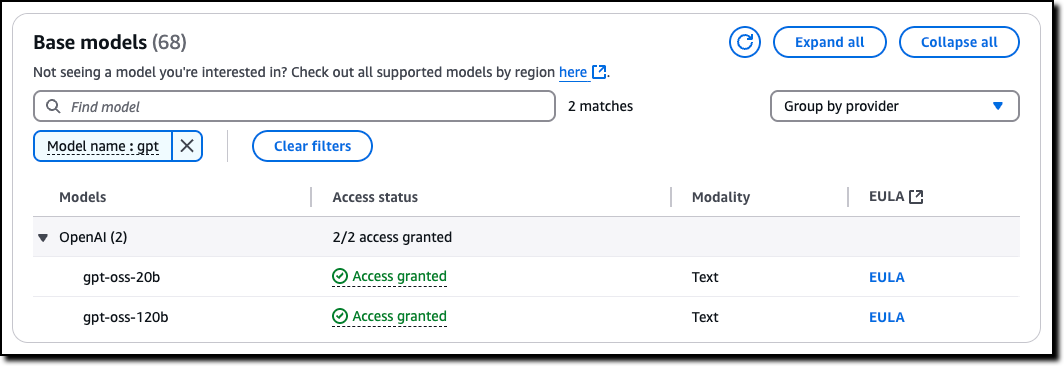
Console screenshot

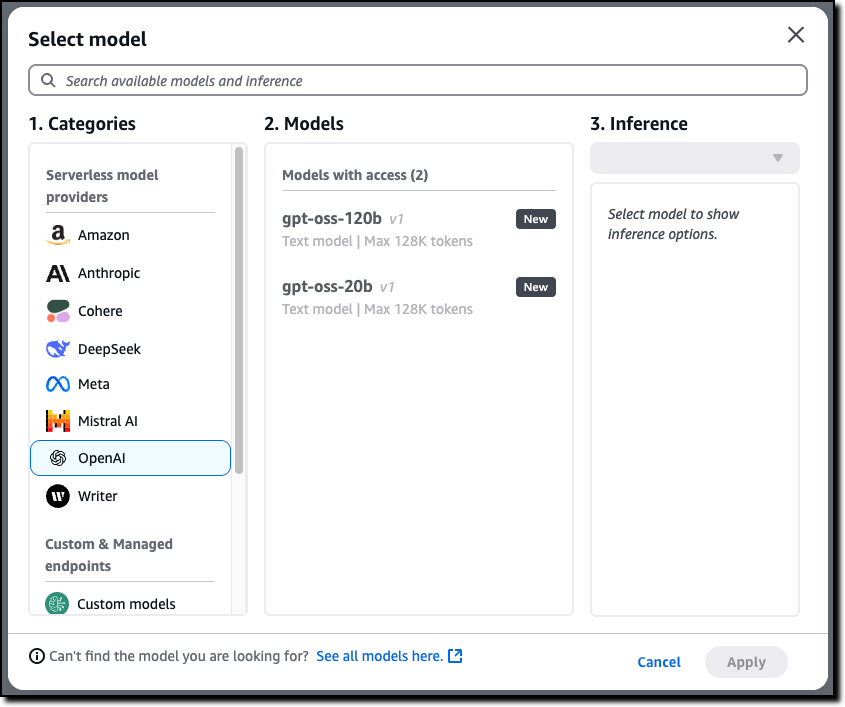
Now that I have access, I use the Chat/Test playground to test and evaluate the models. I select OpenAI as the category and then the gpt-oss-120b model.
Console screenshot

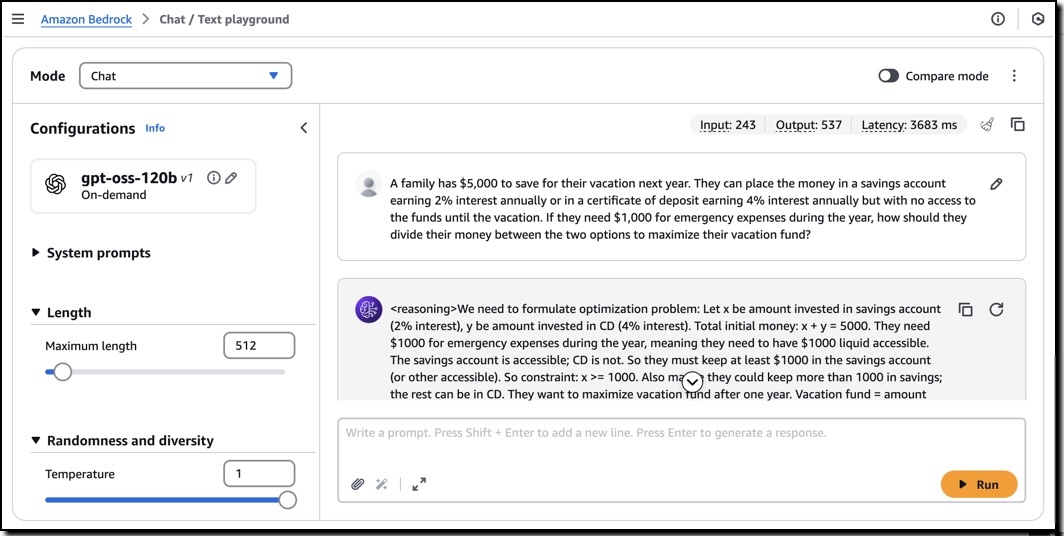
Using this model, I run the following sample prompt:

A family has $5,000 to save for their vacation next year. They can place the money in a savings account earning 2% interest annually or in a certificate of deposit earning 4% interest annually but with no access to the funds until the vacation. If they need $1,000 for emergency expenses during the year, how should they divide their money between the two options to maximize their vacation fund?

This prompt generates an output that includes the chain of thought used to produce the result.
I can use these models with the OpenAI SDK by configuring the API endpoint (base URL) and using an Amazon Bedrock API key for authentication. For example, I set this environment variables to use the US West (Oregon) AWS Region endpoint (us-west-2) and my Amazon Bedrock API key:

export OPENAI_API_KEY="<my-bedrock-api-key>"
export OPENAI_BASE_URL="https://bedrock-runtime.us-west-2.amazonaws.com/openai/v1"

Now I invoke the model using the OpenAI Python SDK.

client = OpenAI()

response = client.chat.completion.create(
    messages=[{
        "role": "user",
        "content": "Hello, how are you?"
    }],
    model="openai.gpt-oss-120b-1:0",
    stream=True
)

for item in response:
    print(item)

To build an AI agent, I can choose any framework that supports the Amazon Bedrock API or the OpenAI API. For example, here’s the starting code for Strands Agents using the Amazon Bedrock API:

from strands import Agent
from strands.models import BedrockModel
from strands_tools import calculator

model = BedrockModel(
    model_id="openai.gpt-oss-120b-1:0"
)
agent = Agent(
    model=model,
    tools=[calculator]
)

agent("Tell me the square root of 42 ^ 3")

I save the code (app.py file), install the dependencies, and run the agent locally:

pip install strands-agents strands-agents-tools
python app.py

When I am satisfied with the agent, I can deploy in production using the capabilities offered by Amazon Bedrock AgentCore, including a fully managed serverless runtime and memory and identity management.

Getting started with OpenAI open weight models in Amazon SageMaker JumpStart
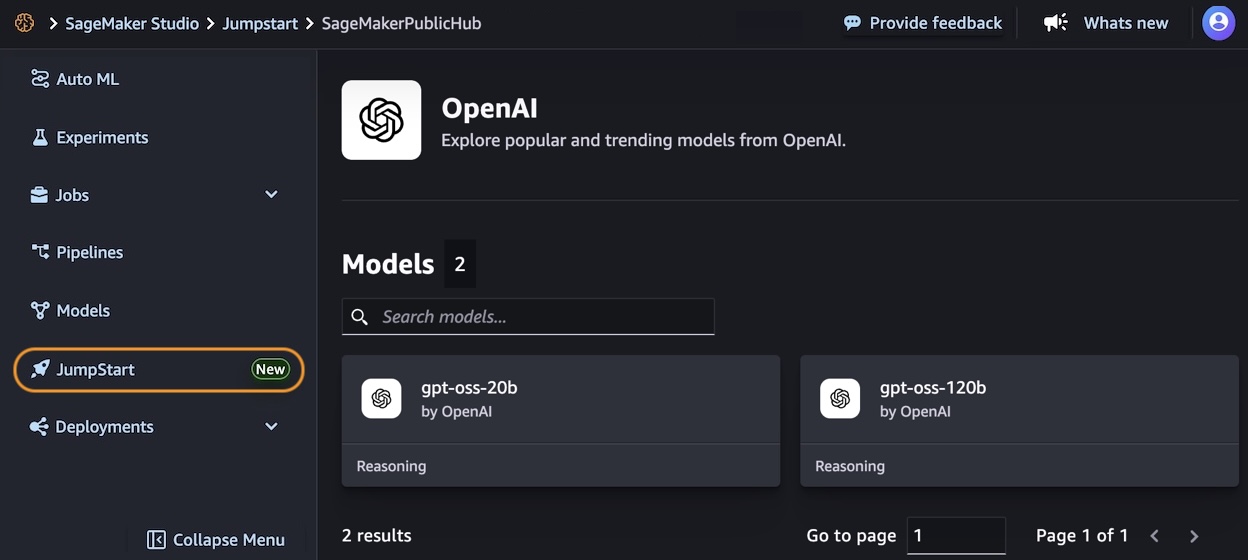
In the Amazon SageMaker AI console, you can use OpenAI open weight models in the SageMaker Studio. The first time I do this, I need to set up a SageMaker domain. There are options to set it up for a single user (simpler) or an organization. For these tests, I use a single user setup.

In the SageMaker JumpStart model view, I have access to a detailed description of the gpt-oss-120b or gpt-oss-20b model.
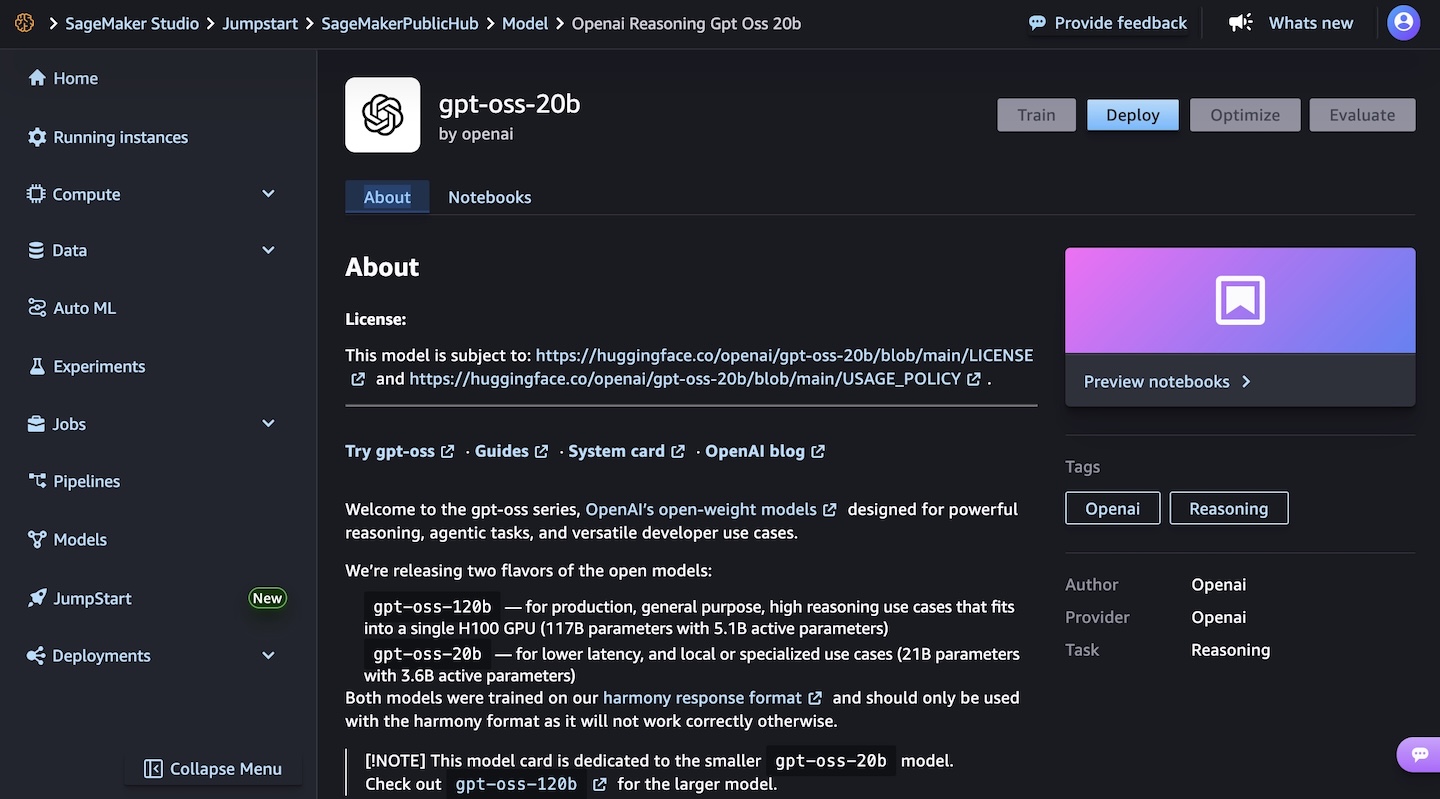
I choose the gpt-oss-20b model and then deploy the model. In the next steps, I select the instance type and the initial instance count. After a few minutes, the deployment creates an endpoint that I can then invoke in SageMaker Studio and using any AWS SDKs.
To learn more, visit GPT OSS models from OpenAI are now available on SageMaker JumpStart in the AWS Artificial Intelligence Blog.

Things to know
The new OpenAI open weight models are now available in Amazon Bedrock in the US West (Oregon) AWS Region, while Amazon SageMaker JumpStart supports these models in US East (Ohio, N. Virginia) and Asia Pacific (Mumbai, Tokyo).

Each model comes equipped with full chain-of-thought output capabilities, providing you with detailed visibility into the model’s reasoning process. This transparency is particularly valuable for applications requiring high levels of interpretability and validation. These models give you the freedom to modify, adapt, and customize them to your specific needs. This flexibility allows you to fine-tune the models for your unique use cases, integrate them into your existing workflows, and even build upon them to create new, specialized models tailored to your industry or application.

Security and safety are built into the core of these models, with comprehensive evaluation processes and safety measures in place. The models maintain compatibility with the standard GPT-4 tokenizer.

Both models can be used in your preferred environment, whether that’s through the serverless experience of Amazon Bedrock or the extensive machine learning (ML) development capabilities of SageMaker JumpStart. For information about the costs associated with using these models and services, visit the Amazon Bedrock pricing and Amazon SageMaker AI pricing pages.

To learn more, see the parameters for the models and the chat completions API in the Amazon Bedrock documentation.

Get started today with OpenAI open weight models on AWS in the Amazon Bedrock console or in Amazon SageMaker AI console.

Danilo

from AWS News Blog https://ift.tt/oTJexK7
via IFTTT

Critical NVIDIA Container Toolkit Flaw Allows Privilege Escalation on AI Cloud Services

Cybersecurity researchers have disclosed a critical container escape vulnerability in the NVIDIA Container Toolkit that could pose a severe threat to managed AI cloud services.
The vulnerability, tracked as CVE-2025-23266, carries a CVSS score of 9.0 out of 10.0. It has been codenamed NVIDIAScape by Google-owned cloud security company Wiz.
“NVIDIA Container Toolkit for all platforms contains a

from The Hacker News https://ift.tt/1IeCvHp
via IFTTT

Veeam Phishing via Wav File, (Fri, Jul 18th)

A interesting phishing attempt was reported by a contact. It started with a simple email that looked like a voice mail notification like many VoIP systems deliver when the call is missed. There was a WAV file attached to the mail[1].

Here is a transcript of the recording:

"Hi, this is xxxx from Veeam Software. I'm calling you today regarding … <not clear> … your backup license which has expired this month. Would you please give me a call to discuss about it?"

This was not targeted because the person who received the mail was not involved with Veeam (or any IT environment). Did you receive such emails recently or in the past?

[1] https://blog.rootshell.be/stuff/veeam-voicemsg.wav

Xavier Mertens (@xme)
Xamecosys
Senior ISC Handler – Freelance Cyber Security Consultant
PGP Key

(c) SANS Internet Storm Center. https://isc.sans.edu Creative Commons Attribution-Noncommercial 3.0 United States License.

from SANS Internet Storm Center, InfoCON: green https://ift.tt/fE32WSv
via IFTTT

Simplify serverless development with console to IDE and remote debugging for AWS Lambda

Today, we’re announcing two significant enhancements to AWS Lambda that make it easier than ever for developers to build and debug serverless applications in their local development environments: console to IDE integration and remote debugging. These new capabilities build upon our recent improvements to the Lambda development experience, including the enhanced in-console editing experience and the improved local integrated development environment (IDE) experience launched in late 2024.

When building serverless applications, developers typically focus on two areas to streamline their workflow: local development environment setup and cloud debugging capabilities. While developers can bring functions from the console to their IDE, they’re looking for ways to make this process more efficient. Additionally, as functions interact with various AWS services in the cloud, developers want enhanced debugging capabilities to identify and resolve issues earlier in the development cycle, reducing their reliance on local emulation and helping them optimize their development workflow.

Console to IDE integration

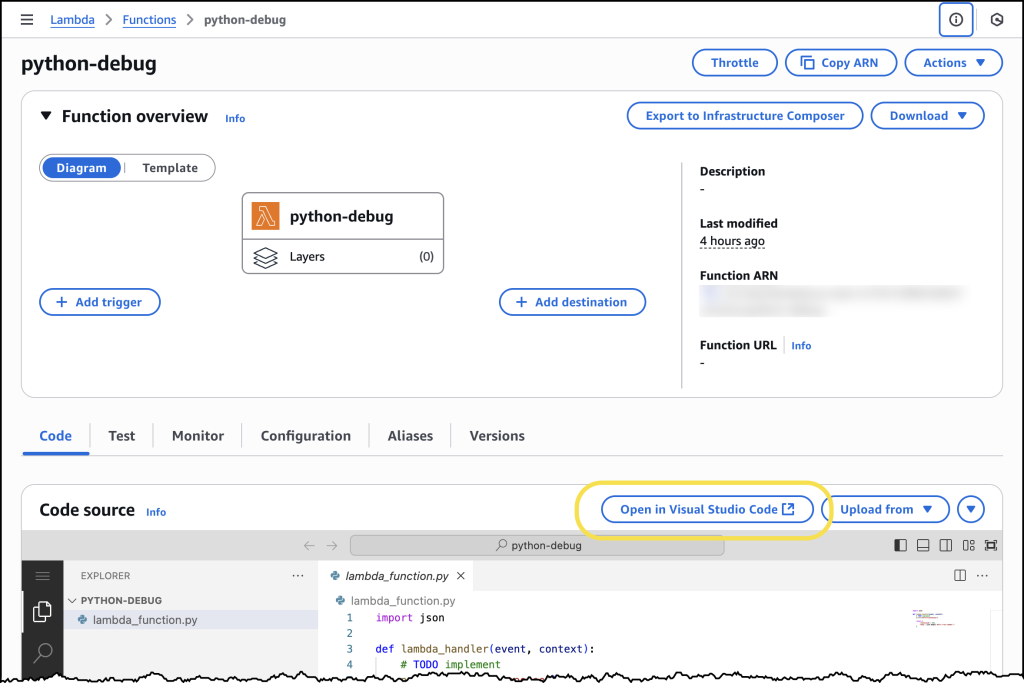
To address the first challenge, we’re introducing console to IDE integration, which streamlines the workflow from the AWS Management Console to Visual Studio Code (VS Code). This new capability adds an Open in Visual Studio Code button to the Lambda console, enabling developers to quickly move from viewing their function in the browser to editing it in their IDE, eliminating the time-consuming setup process for local development environments.

The console to IDE integration automatically handles the setup process, checking for VS Code installation and the AWS Toolkit for VS Code. For developers that have everything already configured, choosing the button immediately opens their function code in VS Code, so they can continue editing and deploy changes back to Lambda in seconds. If VS Code isn’t installed, it directs developers to the download page, and if the AWS Toolkit is missing, it prompts for installation.

To use console to IDE, look for the Open in VS Code button in either the Getting Started popup after creating a new function or the Code tab of existing Lambda functions. After selecting, VS Code opens automatically (installing AWS Toolkit if needed). Unlike the console environment, you now have access to a full development environment with integrated terminal – a significant improvement for developers who need to manage packages (npm install, pip install), run tests, or use development tools like linters and formatters. You can edit code, add new files/folders, and any changes you make will trigger an automatic deploy prompt. When you choose to deploy, the AWS Toolkit automatically deploys your function to your AWS account.

Screenshot showing Console to IDE

Remote debugging

Once developers have their functions in their IDE, they can use remote debugging to debug Lambda functions deployed in their AWS account directly from VS Code. The key benefit of remote debugging is that it allows developers to debug functions running in the cloud while integrated with other AWS services, enabling faster and more reliable development.

With remote debugging, developers can debug their functions with complete access to Amazon Virtual Private Cloud (VPC) resources and AWS Identity and Access Management (AWS IAM) roles, eliminating the gap between local development and cloud execution. For example, when debugging a Lambda function that interacts with an Amazon Relational Database Service (Amazon RDS) database in a VPC, developers can now debug the execution environment of the function running in the cloud within seconds, rather than spending time setting up a local environment that might not match production.

Getting started with remote debugging is straightforward. Developers can select a Lambda function in VS Code and enable debugging in seconds. AWS Toolkit for VS Code automatically downloads the function code, establishes a secure debugging connection, and enables breakpoint setting. When debugging is complete, AWS Toolkit for VS Code automatically cleans up the debugging configuration to prevent any impact on production traffic.

Let’s try it out

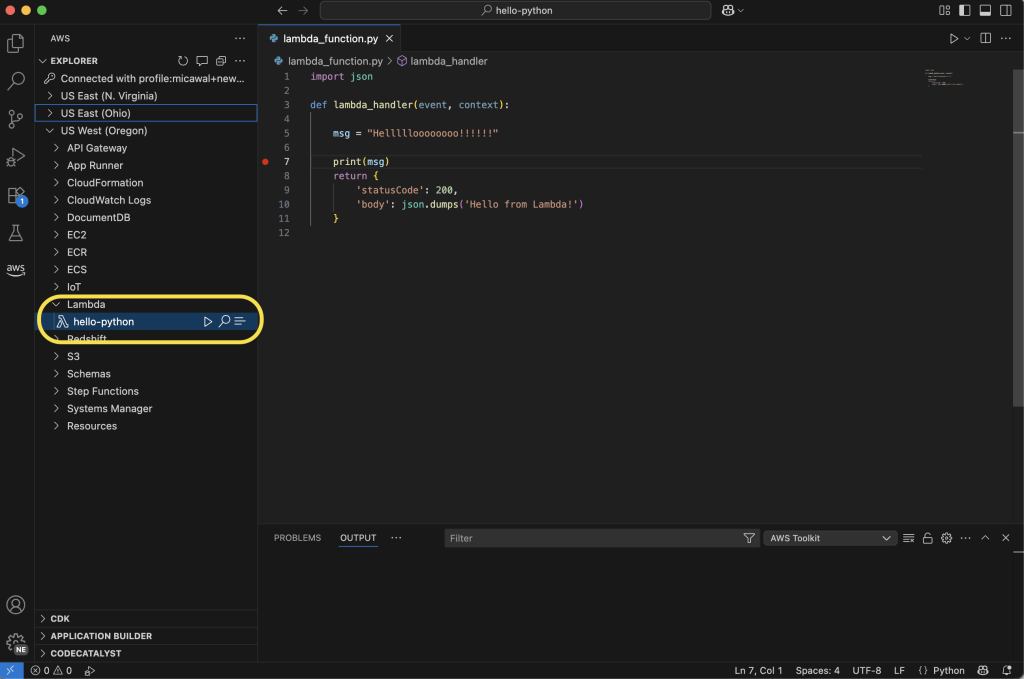
To take remote debugging for a spin, I chose to start with a basic “hello world” example function, written in Python. I had previously created the function using the AWS Management Console for AWS Lambda. Using the AWS Toolkit for VS Code, I can navigate to my function in the Explorer pane. Hovering over my function, I can right-click (ctrl-click in Windows) to download the code to my local machine to edit the code in my IDE. Saving the file will ask me to decide if I want to deploy the latest changes to Lambda.

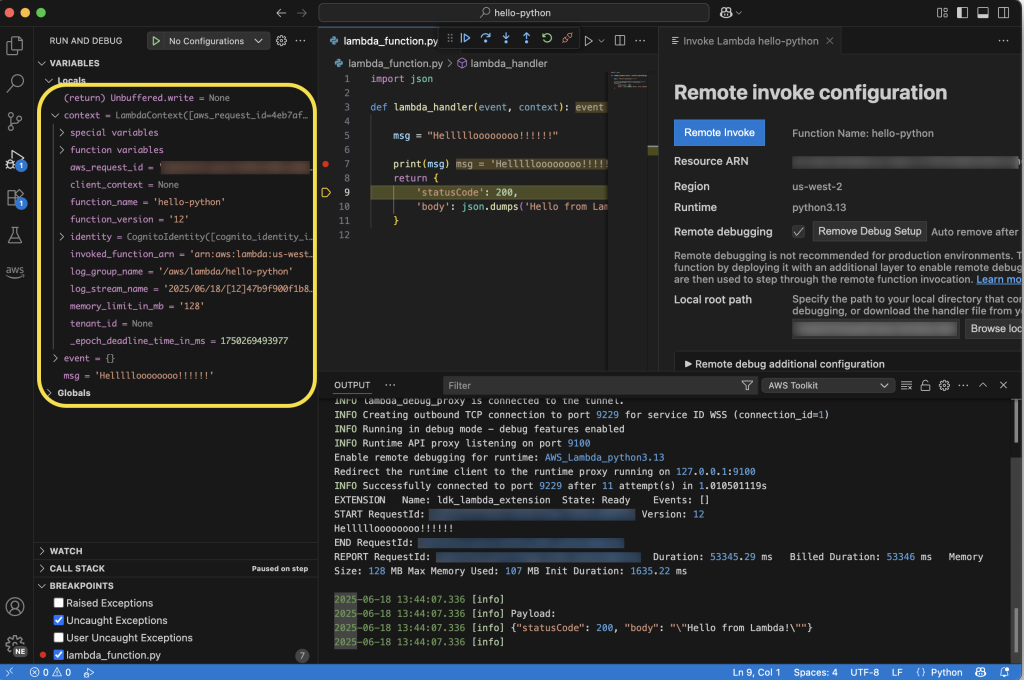
Screenshot view of the Lambda Debugger in VS Code

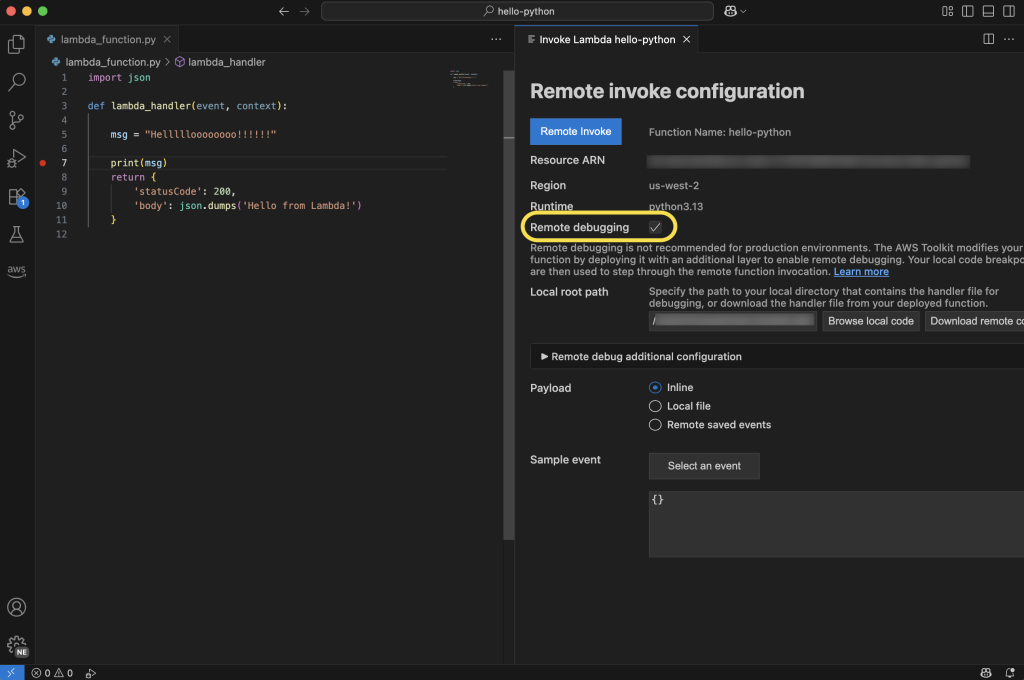
From here, I can select the play icon to open the Remote invoke configuration page for my function. This dialog will now display a Remote debugging option, which I configure to point at my local copy of my function handler code. Before choosing Remote invoke, I can set breakpoints on the left anywhere I want my code to pause for inspection.

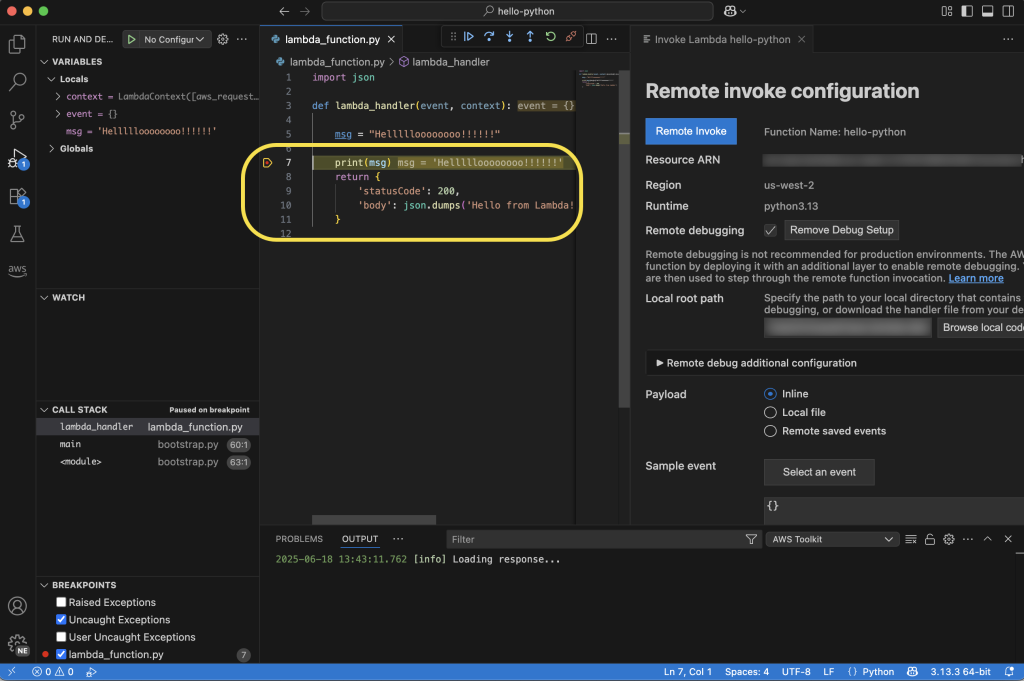
My code will be running in the cloud after it’s invoked, and I can monitor its status in real time in VS Code. In the following screenshot, you can see I’ve set a breakpoint at the print statement. My function will pause execution at this point in my code, and I can inspect things like local variable values before either continuing to the next breakpoint or stepping into the code line by line.

Here, you can see that I’ve chosen to step into the code, and as I go through it line by line, I can see the context and local and global variables displayed on the left side of the IDE. Additionally, I can follow the logs in the Output tab at the bottom of the IDE. As I step through, I’ll see any log messages or output messages from the execution of my function in real time.

Enhanced development workflow

These new capabilities work together to create a more streamlined development experience. Developers can start in the console, quickly transition to VS Code using the console to IDE integration, and then use remote debugging to debug their functions running in the cloud. This workflow eliminates the need to switch between multiple tools and environments, helping developers identify and fix issues faster.

Console to IDE is available for all Lambda runtimes, at no additional cost. Remote debugging will support Python, Node.js, and Java runtimes at launch, with plans to expand support to additional runtimes in the future. Remote debugging is available at no additional cost—you pay only for the standard Lambda execution costs during debugging sessions.

Now available

You can start using these new features through the AWS Management Console and VS Code with the AWS Toolkit for VS Code (v3.69.0 or later) installed. Console to IDE integration is available in all commercial AWS Regions where Lambda is available, except AWS GovCloud (US) Regions. Learn more about it in Lambda and AWS Toolkit for VS Code documentation. To learn more about remote debugging capability, including AWS Regions it is available in, visit the AWS Toolkit for VS Code and Lambda documentation.

These enhancements represent a significant step forward in simplifying the serverless development experience, which means developers can build and debug Lambda functions more efficiently than ever before.

from AWS News Blog https://ift.tt/3OAWJy0
via IFTTT

AWS AI League: Learn, innovate, and compete in our new ultimate AI showdown

Since 2018, AWS DeepRacer has engaged over 560,000 builders worldwide, demonstrating that developers learn and grow through competitive experiences. Today, we’re excited to expand into the generative AI era with AWS Artificial Intelligence (AI) League.

This is a unique competitive experience – your chance to dive deep into generative AI regardless of your skill level, compete with peers, and build solutions that solve actual business problems through an engaging, competitive experience.

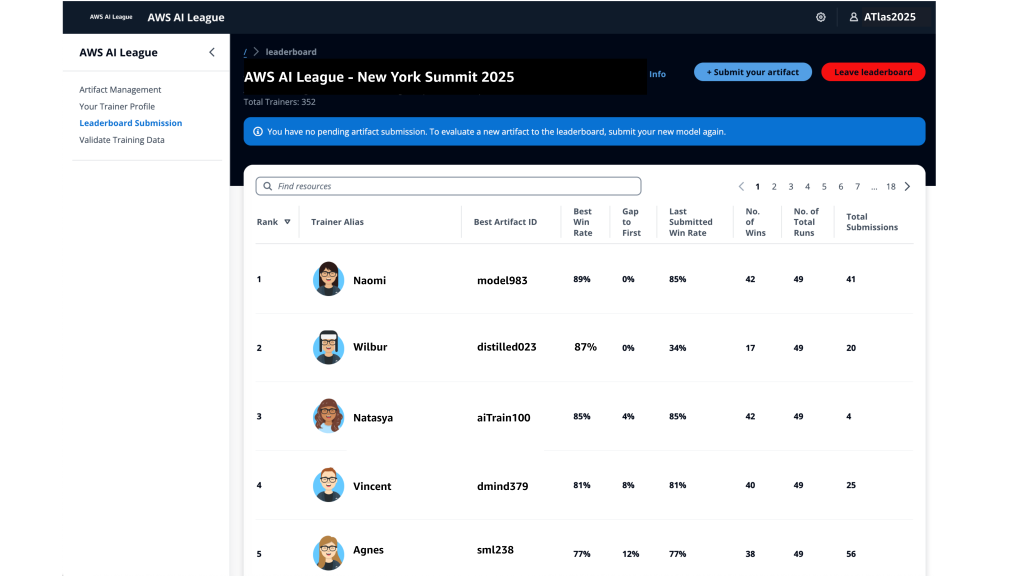
With AWS AI League, your organization hosts private tournaments where teams collaborate and compete to solve real-world business use cases using practical AI skills. Participants craft effective prompts and fine-tune models while building powerful generative AI solutions relevant for their business. Throughout the competition, participants’ solutions are evaluated against reference standards on a real-time leaderboard that tracks performance based on accuracy and latency.

The AWS AI League experience starts with a 2-hour hands-on workshop led by AWS experts. This is followed by self-paced experimentation, culminating in a gameshow-style grand finale where participants showcase their generative AI creations addressing business challenges. Organizations can set up their own AWS AI League within half a day. The scalable design supports 500 to 5,000 employees while maintaining the same efficient timeline.

Supported by up to $2 million in AWS credits and a $25,000 championship prize pool at AWS re:Invent 2025, the program provides a unique opportunity to solve real business challenges.

AWS AI League transforms how organizations develop generative AI capabilities
AWS AI League transforms how organizations develop generative AI capabilities by combining hands-on skills development, domain expertise, and gamification. This approach makes AI learning accessible and engaging for all skill levels. Teams collaborate through industry-specific challenges that mirror real organizational needs, with each challenge providing reference datasets and evaluation standards that reflect actual business requirements.

  • Customizable industry-specific challenges – Tailor competitions to your specific business context. Healthcare teams work on patient discharge summaries, financial services focus on fraud detection, and media companies develop content creation solutions.
  • Integrated AWS AI stack experience – Participants gain hands-on experience with AWS AI and ML tools, including Amazon SageMaker AI, Amazon Bedrock, and Amazon Nova, accessible from Amazon SageMaker Unified Studio. Teams work through a secure, cost-controlled environment within their organization’s AWS account.
  • Real-time performance tracking – The leaderboard evaluates submissions against established benchmarks and reference standards throughout the competition, providing immediate feedback on accuracy and speed so teams can iterate and improve their solutions. During the final round, this scoring includes expert evaluation where domain experts and a live audience participate in real-time voting to determine which AI solutions best solve real business challenges.

  • AWS AI League offers two foundational competition tracks:
    • Prompt Sage – The Ultimate Prompt Battle – Race to craft the perfect AI prompts that unlock breakthrough solutions. whether you detect financial fraud or streamlining healthcare workflows, every word counts as they climb the leaderboard using zero-shot learning and chain-of-thought reasoning.
    • Tune Whiz – The Model Mastery Showdown – Generic AI models meet their match as you sculpt them into industry-specific powerhouses. Armed with your domain expertise and specialized questions, competitors fine-tune models that speak your business language fluently. Victory goes to who achieve the perfect balance of blazing performance, lightning efficiency, and cost optimization.

As Generative AI continues to evolve, AWS AI League will regularly introduce new challenges and formats in addition to these tracks.

Get started today
Ready to get started? Organizations can host private competitions by applying through the AWS AI League page. Individual developers can join public competitions at AWS Summits and AWS re:Invent.

PS: Writing a blog post at AWS is always a team effort, even when you see only one name under the post title. In this case, I want to thank Natasya Idries, for her generous help with technical guidance, and expertise, which made this overview possible and comprehensive.

— Eli

from AWS News Blog https://ift.tt/YyZcs60
via IFTTT